LogMaster: know exactly what to cut — before you make the first cut.
Scan the log with your iPhone or iPad. LogMaster shows you the cuts a master sawyer would make — a step-by-step sequence sized to your mill, your products, and your prices. New to sawmilling? You'll saw your first log like your ten-thousandth.
From scan to cut plan, start to finish.
A real log, scanned and solved in the app — no narration.

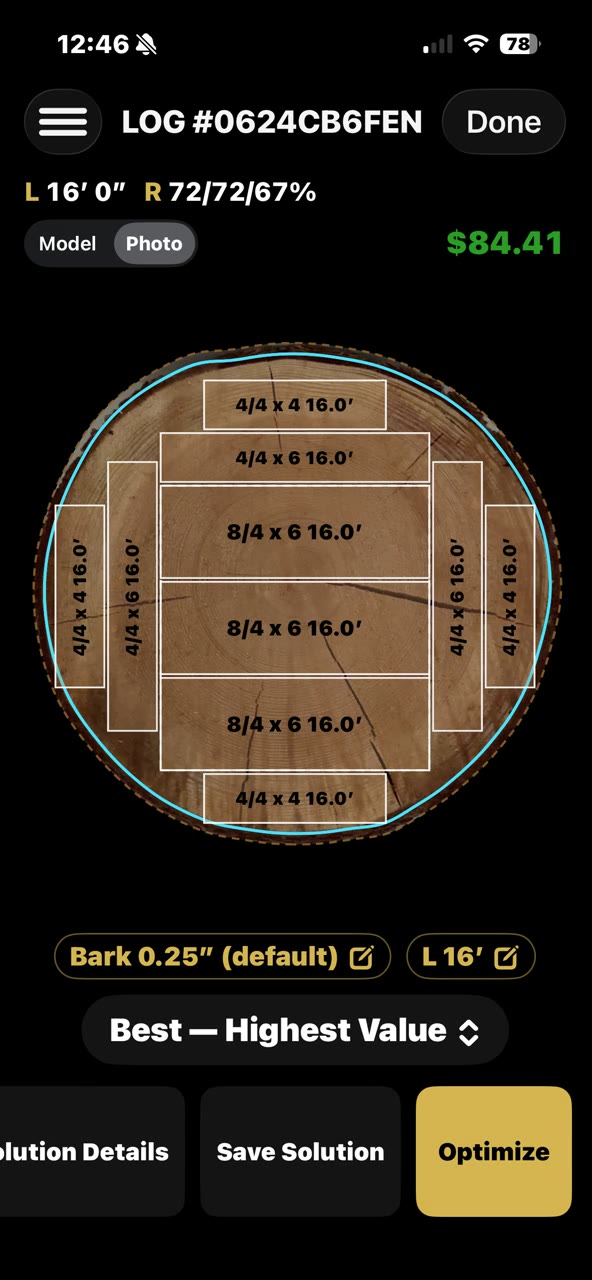
Every miscut is money left on the ground.
Deciding how to cut a log by eye — or even with a tape measure — means you're guessing. LogMaster replaces the guess with a calculated cut plan based on the actual geometry of that specific log.
"The difference between a good cut and a great cut is knowing what's inside the log before you touch it with the blade. LogMaster gives you that knowledge in seconds."
From log to cut plan in four steps.
No complicated setup. No steep learning curve. Open the app, scan the log, and get a cut plan in under a minute.
Scan the log
The LiDAR scanner captures an accurate 3D model of the log — diameter, taper, and shape. Same scanning engine as LogScanner, included at no extra cost. No separate app needed.
Review the geometry
LogMaster displays the log's actual measurements on screen. Diameter, taper, volume — no tape, no estimation. What you see is exactly what you've got.
Get your cut plan
The optimization engine calculates the cut pattern that maximizes board foot yield from that specific log's shape and dimensions. Every log is different — your cut plan should be too.
Export and cut
Save and export the cut plan as a report. Take it to the mill, share it with your crew, or archive it for your records. Every decision documented.
Shooters have a rule: spend as much on your optics as on your rifle — the finest barrel can't hit what it can't see. Your mill is the rifle. LogMaster is the glass. It sees the log — sweep, taper, every usable inch — and tells you exactly where to aim each cut.
Everything in LogScanner, plus optimization.
LogMaster is the complete package — full scanning is included, so you don't need to open a separate app just to capture the log.
LiDAR scanning
Full LiDAR scanning included. No separate app needed. Works on iPhone 12 Pro and later, and on iPad Pro with LiDAR.
Cut optimization
Calculates the cut pattern that gets the most board feet out of each log's actual shape. Stop leaving value in the slab pile.
Yield maximization
Every log is different. LogMaster treats it that way — each cut plan is calculated from that log's specific geometry, not a generic template.
Export cut plans
Save and share reports for each log. Build a record of every cut decision you make. Share with your crew or archive for future reference.
LogScanner or LogMaster?
If you need scanning and measurements on the go, LogScanner is free and the right starting point. If you're optimizing cuts and maximizing yield at the mill, LogMaster is the tool for the job.
Scanning and measurements for the field, at no cost. Great for buyers, sellers, and anyone who needs accurate log dimensions on the go.
- LiDAR scanning
- Measurements on screen
- Save and export scan files
- Volume calculations
- Cut optimization not included
or $79.99 / 6 months · $149.99 / year
The full toolkit for sawmill operators. Scan, measure, optimize, and export — everything in one subscription. A subscription is required to use LogMaster; there is no free tier.
- LiDAR scanning
- Measurements on screen
- Save and export scan files
- Volume calculations
- Cut optimization against your own products and prices
- Yield / board foot maximization
- Step-by-step cut sequence — turns, toe lifts, saw heights
- Printable cut sheet, solution and batch reports, CSV
How much is your time worth? Learning to read a log takes years — and a lot of ruined boards. LogMaster builds that judgment in for about 50¢ a day, and pays for itself on the first log.
What you need
LogMaster runs on iPhone and iPad. Scanning is included — no need to install LogScanner separately.
| Platform | iPhone and iPad — iOS 17 or later |
| Scanning device | iPhone 12 Pro or later, or iPad Pro with LiDAR |
| LogScanner required | No — scanning is included |
| Extra hardware | None |
| Availability | App Store — iPhone and iPad |
User Manual
Reference documentation for Log Master: every screen, and every field on it.
Choosing your first mill? Read our buyer's guide.
Need the board feet in a log you already have? Try our log scale calculator.
LogMaster: know exactly what to cut — before you make the first cut.
Scan the log with your iPhone or iPad. LogMaster shows you the cuts a master sawyer would make — a step-by-step sequence sized to your mill, your products, and your prices. New to sawmilling? You'll saw your first log like your ten-thousandth.
From scan to cut plan, start to finish.
A real log, scanned and solved in the app — no narration.
Every miscut is money left on the ground.
Deciding how to cut a log by eye — or even with a tape measure — means you're guessing. LogMaster replaces the guess with a calculated cut plan based on the actual geometry of that specific log.
"The difference between a good cut and a great cut is knowing what's inside the log before you touch it with the blade. LogMaster gives you that knowledge in seconds."
From log to cut plan in four steps.
No complicated setup. No steep learning curve. Open the app, scan the log, and get a cut plan in under a minute.
Scan the log
The LiDAR scanner captures an accurate 3D model of the log — diameter, taper, and shape. Same scanning engine as LogScanner, included at no extra cost. No separate app needed.
Review the geometry
LogMaster displays the log's actual measurements on screen. Diameter, taper, volume — no tape, no estimation. What you see is exactly what you've got.
Get your cut plan
The optimization engine calculates the cut pattern that maximizes board foot yield from that specific log's shape and dimensions. Every log is different — your cut plan should be too.
Export and cut
Save and export the cut plan as a report. Take it to the mill, share it with your crew, or archive it for your records. Every decision documented.
Shooters have a rule: spend as much on your optics as on your rifle — the finest barrel can't hit what it can't see. Your mill is the rifle. LogMaster is the glass. It sees the log — sweep, taper, every usable inch — and tells you exactly where to aim each cut.
Everything in LogScanner, plus optimization.
LogMaster is the complete package — full scanning is included, so you don't need to open a separate app just to capture the log.
LiDAR scanning
Full LiDAR scanning included. No separate app needed. Works on iPhone 12 Pro and later, and on iPad Pro with LiDAR.
Cut optimization
Calculates the cut pattern that gets the most board feet out of each log's actual shape. Stop leaving value in the slab pile.
Yield maximization
Every log is different. LogMaster treats it that way — each cut plan is calculated from that log's specific geometry, not a generic template.
Export cut plans
Save and share reports for each log. Build a record of every cut decision you make. Share with your crew or archive for future reference.
LogScanner or LogMaster?
If you need scanning and measurements on the go, LogScanner is free and the right starting point. If you're optimizing cuts and maximizing yield at the mill, LogMaster is the tool for the job.
Scanning and measurements for the field, at no cost. Great for buyers, sellers, and anyone who needs accurate log dimensions on the go.
- LiDAR scanning
- Measurements on screen
- Save and export scan files
- Volume calculations
- Cut optimization not included
or $79.99 / 6 months · $149.99 / year
The full toolkit for sawmill operators. Scan, measure, optimize, and export — everything in one subscription. A subscription is required to use LogMaster; there is no free tier.
- LiDAR scanning
- Measurements on screen
- Save and export scan files
- Volume calculations
- Cut optimization against your own products and prices
- Yield / board foot maximization
- Step-by-step cut sequence — turns, toe lifts, saw heights
- Printable cut sheet, solution and batch reports, CSV
How much is your time worth? Learning to read a log takes years — and a lot of ruined boards. LogMaster builds that judgment in for about 50¢ a day, and pays for itself on the first log.
What you need
LogMaster runs on iPhone and iPad. Scanning is included — no need to install LogScanner separately.
| Platform | iPhone and iPad — iOS 17 or later |
| Scanning device | iPhone 12 Pro or later, or iPad Pro with LiDAR |
| LogScanner required | No — scanning is included |
| Extra hardware | None |
| Availability | App Store — iPhone and iPad |
User Manual
Reference documentation for Log Master: every screen, and every field on it.
Choosing your first mill? Read our buyer's guide.
Need the board feet in a log you already have? Try our log scale calculator.