Manual › Log Master › The optimizer menu
The optimizer menu
The hub for the sawing half of the app. Reached from Log Optimization on the main menu, and from the menu button inside the optimizer.
Documents Log Master 1.03 · updated 2026-09-17
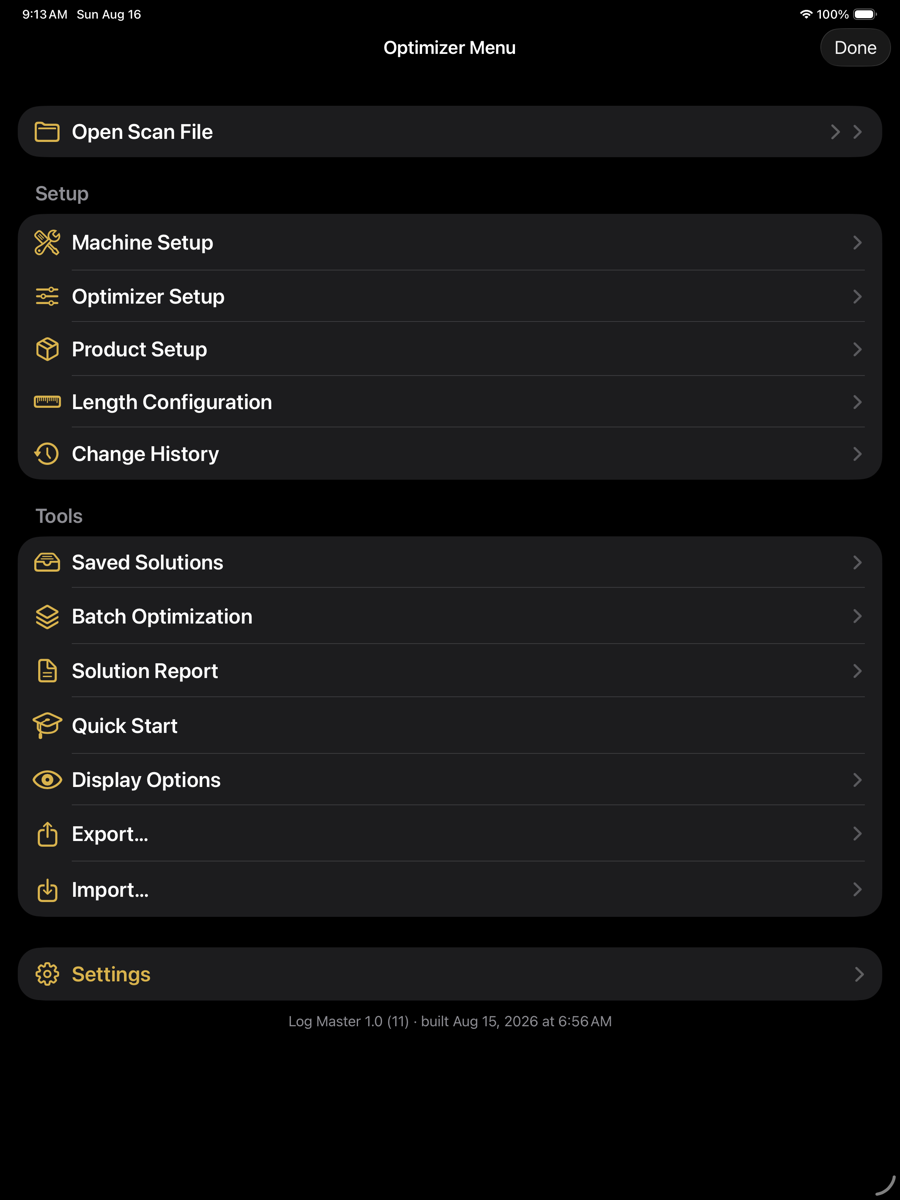
Optimizer Menu — main menu › Log Optimization
Items
Menu items
Item
Section
Description
Open Scan File
top
Lists the scans in the project folder. Selecting one loads it into the optimizer. Files-app import is on that list's own toolbar.
Saved Solutions
Tools
Solutions saved against a scan, grouped by scan.
Batch Optimization
Tools
Solves several scans in one run and produces a combined report.
Solution Report
Tools
A report covering the scans in the project folder, one solution each.
Quick Start
Tools
Replays the nine-step walkthrough of the sawing half of the app.
Display Options
Tools
Controls which data sets appear in each setup picker, and which are locked.
Export…
Tools
Writes selected data sets, scans and solutions to a single transfer pack.
Import…
Tools
Reads a transfer pack.
Build stamp
The line at the foot of the menu gives the version, build number and the date the binary was built — for example Log Master 1.0 (11) · built Aug 15, 2026 at 6:56 AM. Quote it when reporting a problem.
The same menu serves the end-only workflow, where Open Scan File reads Open End Scan and the optimization rows act on end scans.