Manual › Log Master › Saving a solution
Saving a solution
Writes a solution to disk beside its scan, and the library where saved solutions are found afterward.
Documents Log Master 1.04.1 · updated 2026-10-25
Saving a solution
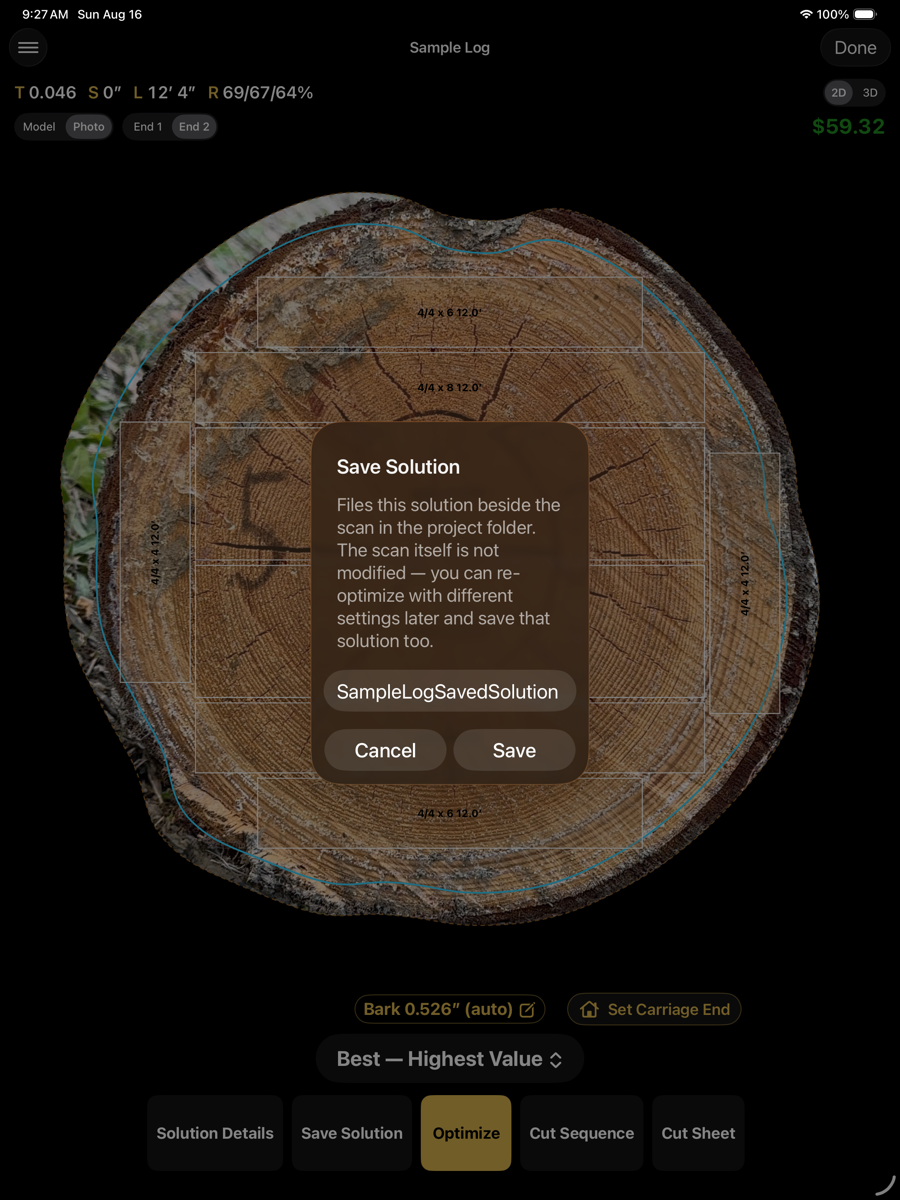
The Save Solution dialog
Reached from Save Solution in the optimizer action row, once a scan has been solved.
1
2
3
Save Solution
1
Name
Text field, pre-filled with the scan name, spaces removed, plus "SavedSolution". Editable before saving.
2
Cancel
Closes the dialog. Nothing is written.
3
Save
Writes the solution to the project folder under this name.
Saving files the solution beside the scan as a .lmsol sidecar. The scan itself is not modified — it can be re-optimized with different settings afterward, and that solution saved too, under a different name.
The Saved Solutions library
Saved Solutions, in the Tools section of the optimizer menu. Lists every .lmsol file in the project folder, grouped by the scan it was saved from.

1
2
3
4
Saved Solutions
1
Back
Chevron, top left. Closes the library.
2
List options
Icon, top right. Further actions for the list below.
3
Group header
The scan the solutions below were saved from.
4
Row
Solution name, board count, the date and time it was saved, and its total value from the active price list.
A scan can carry more than one saved solution — for example, the same log optimized under two different setups. Each is listed as its own row under that scan's group.