Manual › Log Master › Display options
Display options
Controls which data sets appear in each setup picker, and which of them can be edited.
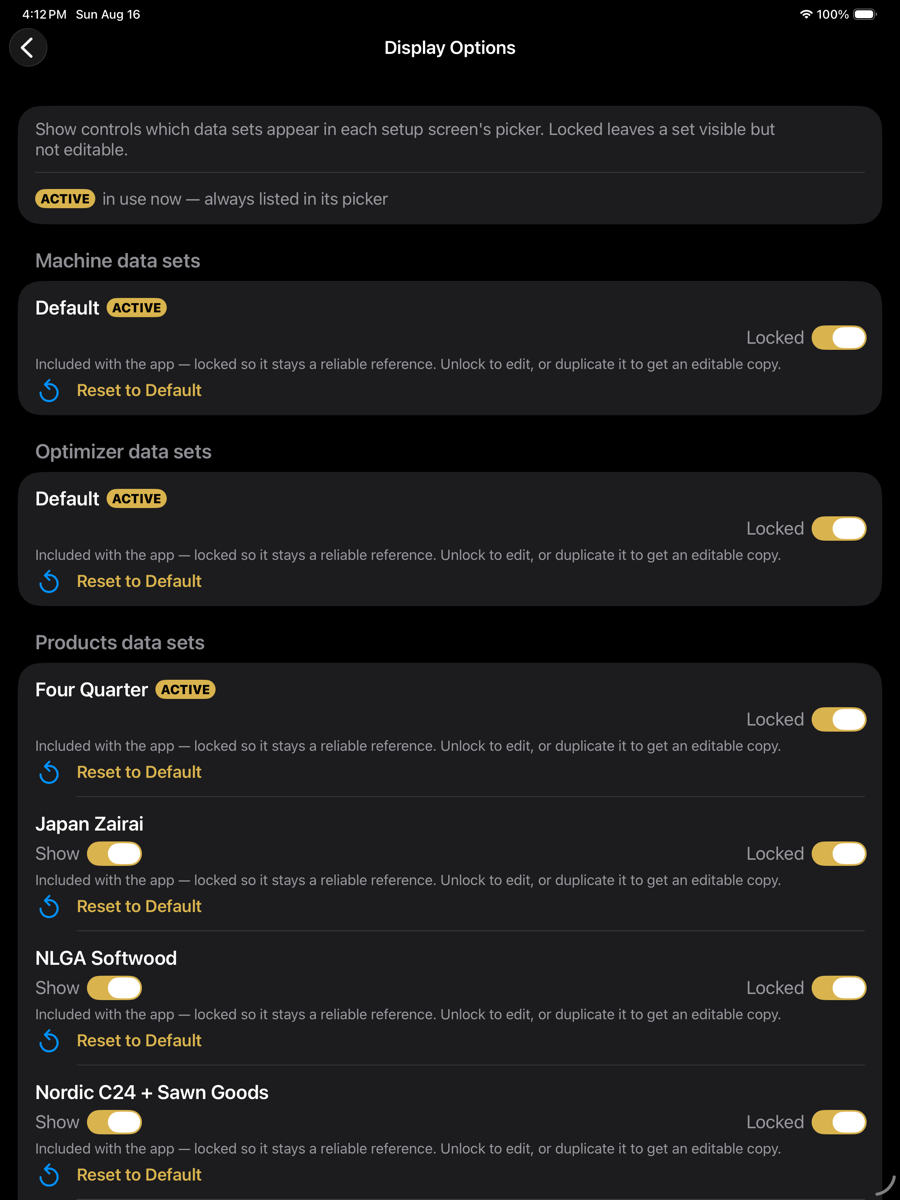
Display Options — optimizer menu › Tools › Display Options
Controls
Sets are grouped by kind: machine, optimizer, products. Each row carries the same two switches.
Per data set
Element
Example
Description
Show
toggle
Whether the set appears in that setup screen's picker. The active set is always listed and has no Show switch.
Locked
toggle
A locked set is visible but cannot be edited. Sets supplied with the app ship locked so they remain a reliable reference.
ACTIVE
badge
Marks the set currently in use. It is always listed regardless of Show.
Reset to Default
action
Restores a supplied set to the contents it shipped with. Only meaningful for sets included with the app.
Locked freezes the set's contents. It does not prevent the set being selected, and it does not affect scans or solutions.
Effect
Turning Show off removes a set from the picker but does not delete it. Duplicating a locked set produces an editable copy under a new name, leaving the original intact.