Manual › Log Master › Machine setup
Machine setup
Machine parameters. Solutions are constrained to the machine described here.
Documents Log Master 1.03 · updated 2026-09-17
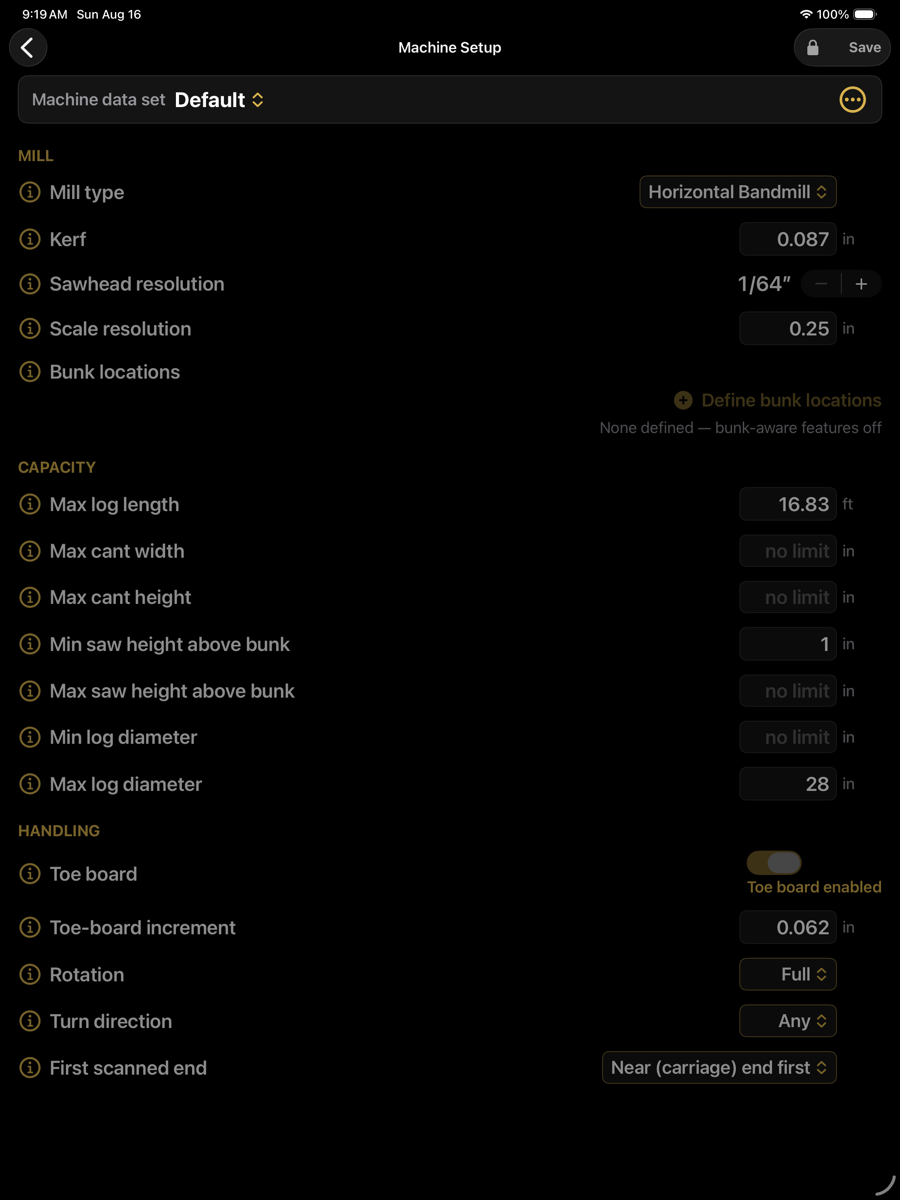
Machine Setup — optimizer menu › Setup › Machine Setup
Parameters are stored in named data sets. Multiple machines can be defined and selected from the picker at the top of the screen. The set supplied with the app is locked; duplicate it to create an editable copy.
Mill
Mill
Parameter
Default value
Description
Mill type
Horizontal Bandmill
Class of sawmill. Determines which of the parameters below apply.
Kerf
0.087 in
Material removed per cut. Should be measured from a cut rather than taken from the blade specification; kerf error accumulates across every cut in the log.
Blade diameter
swing mill only
Swing blade diameter. Informational — the operative limits are the two depth-of-cut caps below. Not shown for a band mill.
Max cut depth — horizontal
swing mill only
Deepest horizontal cut in one pass. Caps every board's sawn width; wider products are excluded automatically. Not shown for a band mill.
Max cut depth — vertical
swing mill only
Deepest vertical cut in one pass. Caps every board's sawn thickness. Not shown for a band mill.
Sawhead resolution
1/64 in
Smallest increment the setworks can be set to. Saw heights in the cut sequence are rounded to this value.
Scale resolution
0.25 in
Increment of the height scale, used when heights are set against a rule rather than by setworks.
Bunk locations
not defined
Bunk positions along the bed, measured from tape zero. While undefined, bunk-aware checks are disabled. When defined, seating of the butt end is evaluated and reported.
Bunk width
4 in
Top width of each bunk along the mill direction — the flat the log actually sits on. One width for all bunks. Shown once bunk locations are set. Blank defaults to 4 in.
Capacity
Fields left blank are treated as unconstrained.
Capacity
Parameter
Default value
Description
Max log length
16.83 ft
Longest log the bed accepts. Longer logs are measured but not solved as a single piece.
Max cant width
no limit
Widest cant the machine can process.
Max cant height
no limit
Tallest cant the machine can process.
Min saw height above bunk
1 in
Lower bound on blade height. Constrains solutions that would place the blade at or below bunk level.
Max saw height above bunk
no limit
Upper bound on sawhead travel.
Min log diameter
no limit
Logs below this diameter are excluded.
Max log diameter
28 in
Largest log the machine accepts.
Handling
Movement available once the log is on the bed. These values determine which cut sequences are physically possible.
Handling
Parameter
Default value
Description
Toe board
enabled
Whether a toe board is fitted. When enabled, solutions may raise one end to align the taper rather than sawing parallel to the bed.
Toe-board increment
0.062 in
Smallest lift the toe board can produce. Lift values in the cut sequence are rounded to this.
Rotation
Full
Available rotation. Full permits any angle; restricted machines index in fixed steps.
Turn direction
Any
Permitted turn directions. Solutions are constrained to turns the machine can perform.
First scanned end
Near (carriage) end first
Which end of the log the scan started from. Determines the orientation of every instruction in the cut sequence; an incorrect value mirrors them.