Change history
What changed in each released version of Log Master, and — a separate, per-device record — every edit saved to a machine, optimizer or product data set, newest first.
Documents Log Master 1.04.1 · updated 2026-10-25
What's new in Log Master
Every released version, newest first. For the in-app record of edits to your own setup data, see Entries below — that is a different screen from this list.
Version history
Version
Released
What changed
1.04.1 (25)
2026-10
Bug fixes and improvements.
1.04 (20)
2026-10
Live-edge slab sawing. Choose a sawing method in Optimizer Setup: Cant sawing, or Live-edge for logs sold by the slab. Live-edge saws straight through the log in flat passes, keeps the natural edge on every slab, honours Free of heart and Boxed heart, and gives you the full cut sequence with saw heights: one roll, one flip. New Live-Edge Slabs product set: full-sawn 8/4, 10/4 and 12/4, priced by width. Nordic C24 and Japanese Zairai product sets, ready to switch on in Display Options. Absolute saw readout: a Machine Setup option that shows each saw height as a decimal-inch position for setworks mills. Preferred Cant/Sideboard mode now solves for your two chosen products only. Redeem an offer code from the subscription screen. Bug fixes and improvements.
1.03.1 (18)
2026-09-17
Bug fixes and improvements.
1.03 (17)
2026-09-15
French. End-only scans now get a full cut sequence, alternating target-face and saw-position instructions as the log turns. Learned end-face boundary detection. Choose Auto or Manual boundary per end, with the choice saved to the scan. Optimize time limit (30 s default) so a solve can't run away at the mill. Bug fixes and performance improvements.
1.0.2 (16)
2026-09-06
Scan Quality indicator on completed scans. "Next Cut Step" — advance the cut sequence hands-free with the iPhone Action Button or Siri. Bug fixes and performance improvements.
1.0.1 (14)
2026-08-25
Opening cuts in the cut sequence now show the predicted face width at each end. Bug fixes.
1.0 (11)
2026-08
First release. Scan a log with LiDAR, get the most valuable way to saw it, and take a step-by-step cut sequence to the mill. Three bundled product sets — Simple NLGA, NLGA Softwood, Four Quarter. Two sample scans built in.
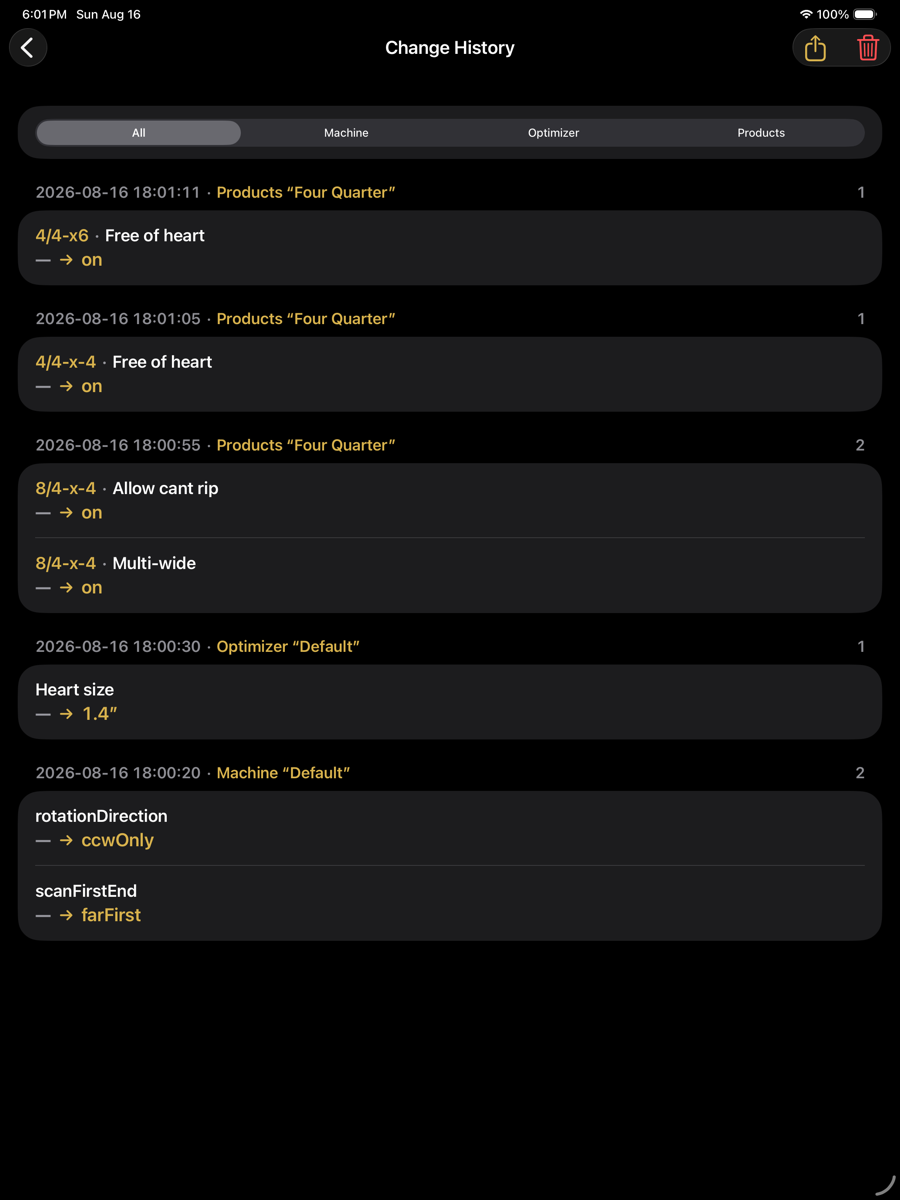
The in-app Change History screen
Separate from the version list above: a per-device record of edits saved to your own machine, optimizer or product data sets.
Change History — optimizer menu › Setup › Change History
Entries
Each save produces one entry, headed by its timestamp and the data set edited. Fields changed in that save are listed beneath it.
Entry contents
Element
Example
Description
Filter
All / Machine / Optimizer / Products
Restricts the list to changes affecting one kind of data set.
Timestamp
2026-08-16 18:01:11
When the change was saved.
Data set
Products “Four Quarter”
Which set was edited, and its name.
Count
1
Number of fields changed in that save.
Context
4/4-x6
The product, group or length the field belongs to. Absent for set-wide fields.
Field
Free of heart
The setting that changed.
Change
— → on
Previous value, then new value. An em dash means the field had no value before.
Share
top right
Exports the history.
Clear
top right
Deletes the history. Requires double confirmation, and the clearing is itself recorded.
What is recorded
Changes to setup data sets only. Scans, solutions and application settings are not recorded here. The history is per device and is not carried in an export pack.