Manual › Log Master › Optimizer setup
Optimizer setup
Optimizer parameters. These constrain how boards are placed within the scanned log.
Documents Log Master 1.04.1 · updated 2026-10-25
Optimizer Setup
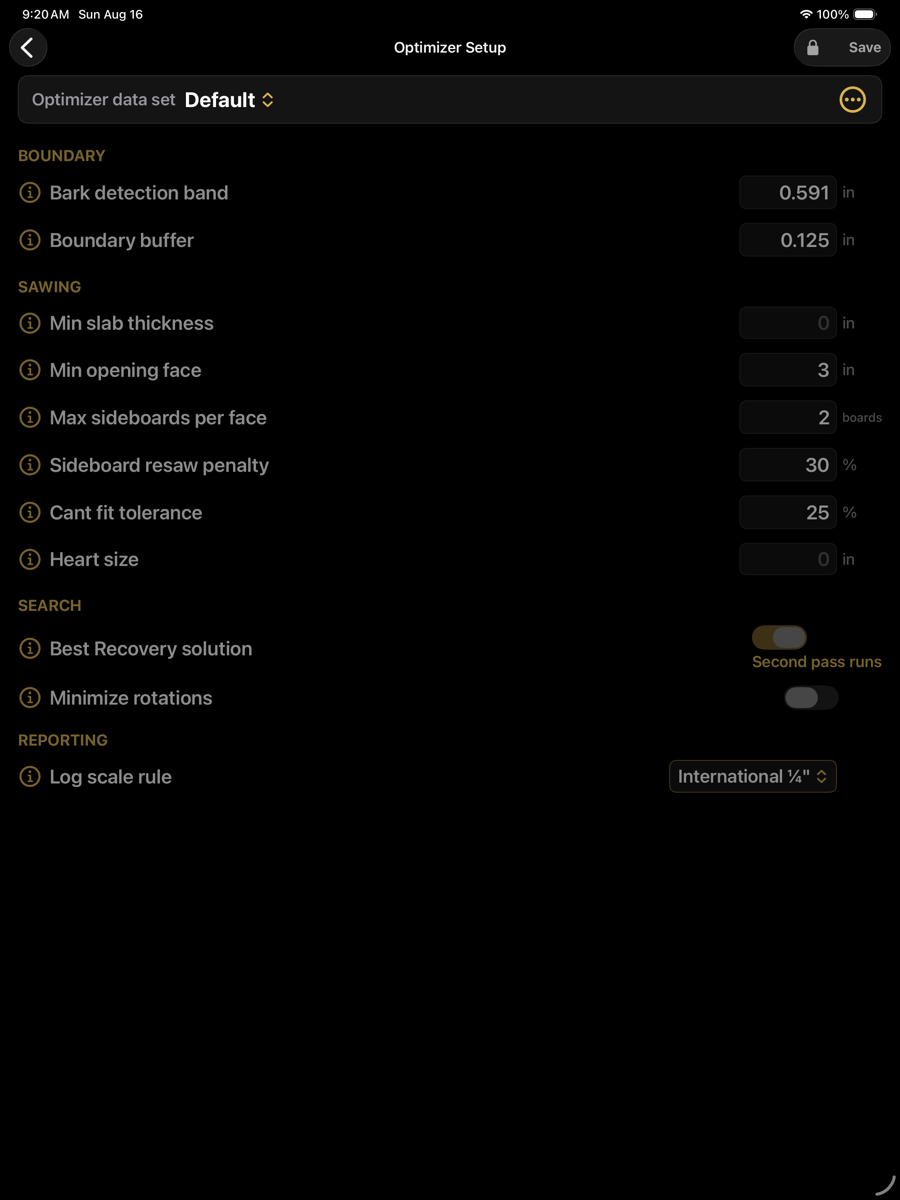
Optimizer Setup — optimizer menu › Setup › Optimizer Setup
Parameters are stored in named data sets, selected from the picker at the top of the screen. The set supplied with the app is locked; duplicate it to create an editable copy.
Boundary
Determines where the wood surface is taken to be, relative to the scanned outline.
Boundary
Parameter
Default value
Description
Bark detection band
0.591 in
Width of the band, measured outward from the traced wood boundary, searched for bark. It also caps the bark allowance the optimizer uses: bark thickness is never taken as more than this band, and a band of 0 means no bark. A bark value entered by hand on the optimizer screen is kept as entered.
Boundary buffer
0.125 in
Clearance held inside the detected wood boundary. Board placement is kept at least this far from the surface.
Sawing
Constraints applied to board placement within the log.
Sawing
Parameter
Default value
Description
Sawing method
Cant sawing
How the log is broken down. Cant sawing squares a cant and takes edged boards off its faces, with sideboards from the slabs; it is the normal pattern for dimension lumber. Live-edge saws straight through the log in flat passes (through-and-through), leaving the natural edge on every slab; the log is rolled once to its best position and turned over once to free the last slab. The product set is read the same way in both: thickness, lengths and prices decide, and a product's width is the band a slab is paid in. Shown for band mills only. Under Live-edge the settings that only steer a cant are hidden: Max sideboards per face, Sideboard resaw penalty, Cant fit tolerance, Heart size, Best Recovery solution, Optimize time limit and Minimize rotations.
Min slab thickness
0 in
Thinnest cut the saw will take, as an actual sawn thickness (not a nominal size). Sideboards and slabs thinner than this are dropped from the solution. Zero applies no minimum. Under Live-edge this is the thinnest waste cut: the round cap taken off the top to open the first face, and the cap left under the last slab, must each be at least this thick.
Min opening face
3 in
Minimum width of the first flat face produced on the log. Under Live-edge it applies to every slab instead: the narrowest face a slab may have, measured at its narrowest point along the log, with the boundary buffer added to that width. Zero lets the narrowest product width in the set decide.
Shorter slab lengths
on — shorter lengths fill
Live-edge only. When the wood above or below the slab stack cannot hold the minimum face for the longest length in the set, the shorter priced lengths are tried before the wood is left as waste. A short slab is only ever a filler. Off: each thickness is sold only at the longest length that fits the log. Price the thin products at the shorter lengths too, or there is nothing to fall back to.
Max sideboards per face
2 boards
Upper limit on boards taken from one face before the log is rotated. Cant sawing only.
Sideboard resaw penalty
30 %
Reduction applied to the value of a sideboard that requires a resaw pass. Raises the threshold at which such boards are selected. Cant sawing only.
Cant fit tolerance
25 %
Proportion by which a cant may fall short of its nominal size and still be accepted. Cant sawing only.
Heart size
2 in
Diameter of the central region treated as heart (pith plus juvenile wood). Products specified free of heart are placed clear of the whole region; products specified boxed heart must contain it. Zero defines no heart region, so the heart is a single point. The supplied Default set uses 2 in; a set saved earlier keeps its own value. The setting is shown with Cant sawing selected; under Live-edge it is hidden, and the stored value still sets the heart region for Free of heart and Boxed heart slabs.
Search
Controls which solutions the optimizer looks for.
Search
Parameter
Default value
Description
Best Recovery solution
on — second pass runs
When enabled, an additional search pass runs and the highest-recovery solution is offered alongside the highest-value one. Increases solve time. Cant sawing only.
Optimize time limit
30 s
Hard limit on how long the search may run for one log. The limit is checked throughout the search, including inside each roll position; a placement already under way is allowed to finish, so a solve can run a moment past the limit. When it expires, the optimizer returns the best solution found so far, marked with a warning — the plan is complete and safe to saw, it just had less time to look for a better one. A search that has not yet found any solution keeps going until it has one. Best Recovery, when enabled, then runs as a separate search on its own clock with the same limit. Blank means no limit. Cant sawing only.
Minimize rotations
off
When enabled, solutions requiring fewer log rotations are preferred where value is otherwise comparable. Cant sawing only.
Reporting
Reporting
Parameter
Default value
Description
Log scale rule
International ¼"
Scaling rule used to compute the reported scale board-foot figure. Affects reporting only; the optimizer does not use it.