Manual › Log Master › Solution report
Solution report
A report covering the scans in the project folder, one solution each.
Documents Log Master 1.04.1 · updated 2026-10-25
Solution Report
Solution Report, in the Tools section of the optimizer menu.
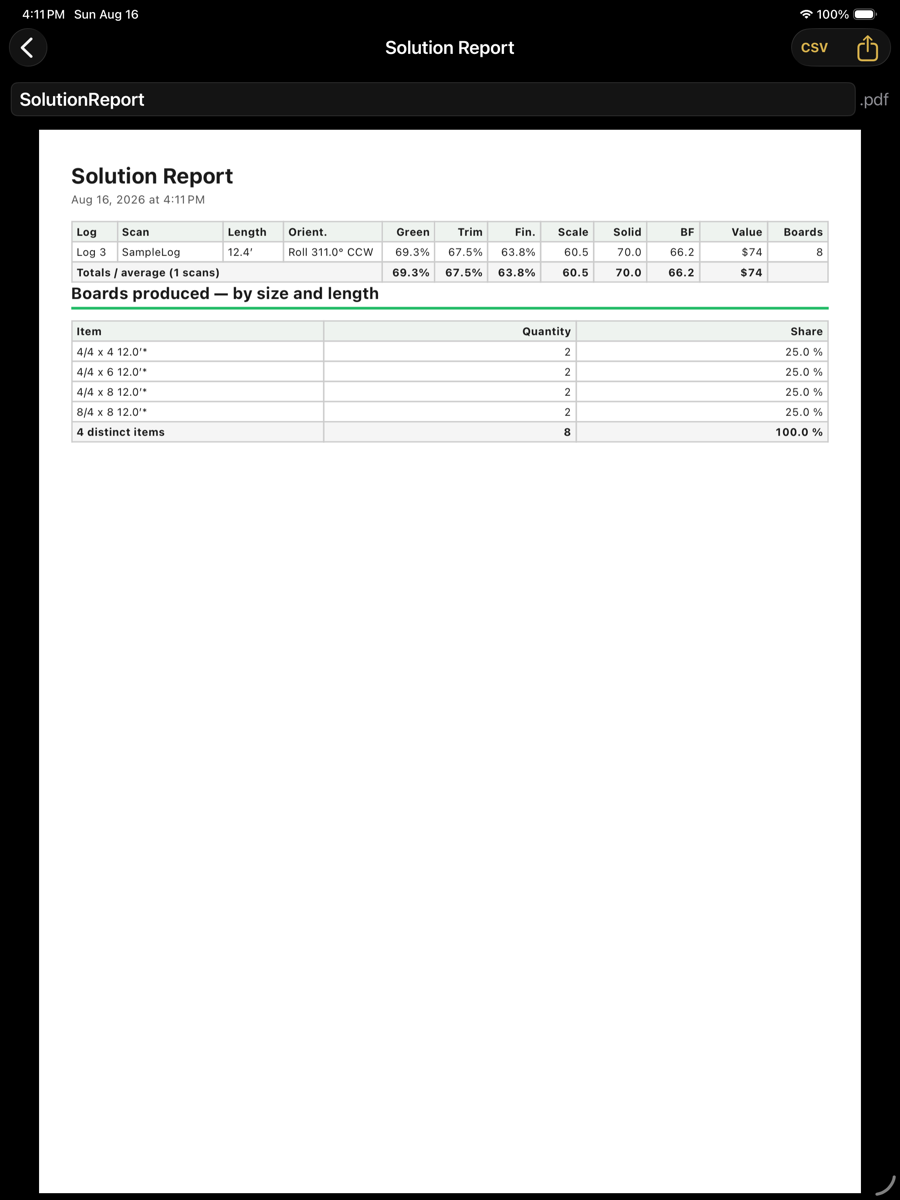
Solution Report
Contents
Contents
Element
Example
Description
Header
title and date/time
Identifies the report and when it was produced.
Per-log table
one row per scan
Log, scan, length, orientation, recovery green / trimmed / finished, scale, solid, BF, value and board count.
Totals / average
bottom row
Recovery figures are averaged; scale, solid, BF and value are summed.
Boards produced
by size and length
Every distinct item, its quantity and its share of the total. An asterisk marks a board sold shorter than the full log length.
Filename
.pdf, editable
Name used when the report is shared or saved.
CSV
top right
Writes the same data as a spreadsheet.
Share
top right
Sends the PDF.
Compare Batch Optimization, which solves every queued scan in one run before reporting on it.
Solutions saved under the Live-edge sawing method are reported the same way as in Batch optimization: slabs are counted rather than boards, and the cant column reads Slab stack.