Manual › Log Master › The cut sheet
The cut sheet
A printed summary of the cut sequence. The cut sequence itself, in the app, is the working output.
Documents Log Master 1.04.1 · updated 2026-10-25
The cut sheet
Reached from Cut Sheet in the optimizer action row, once a scan has been solved. Exported as a PDF for printing or sharing.
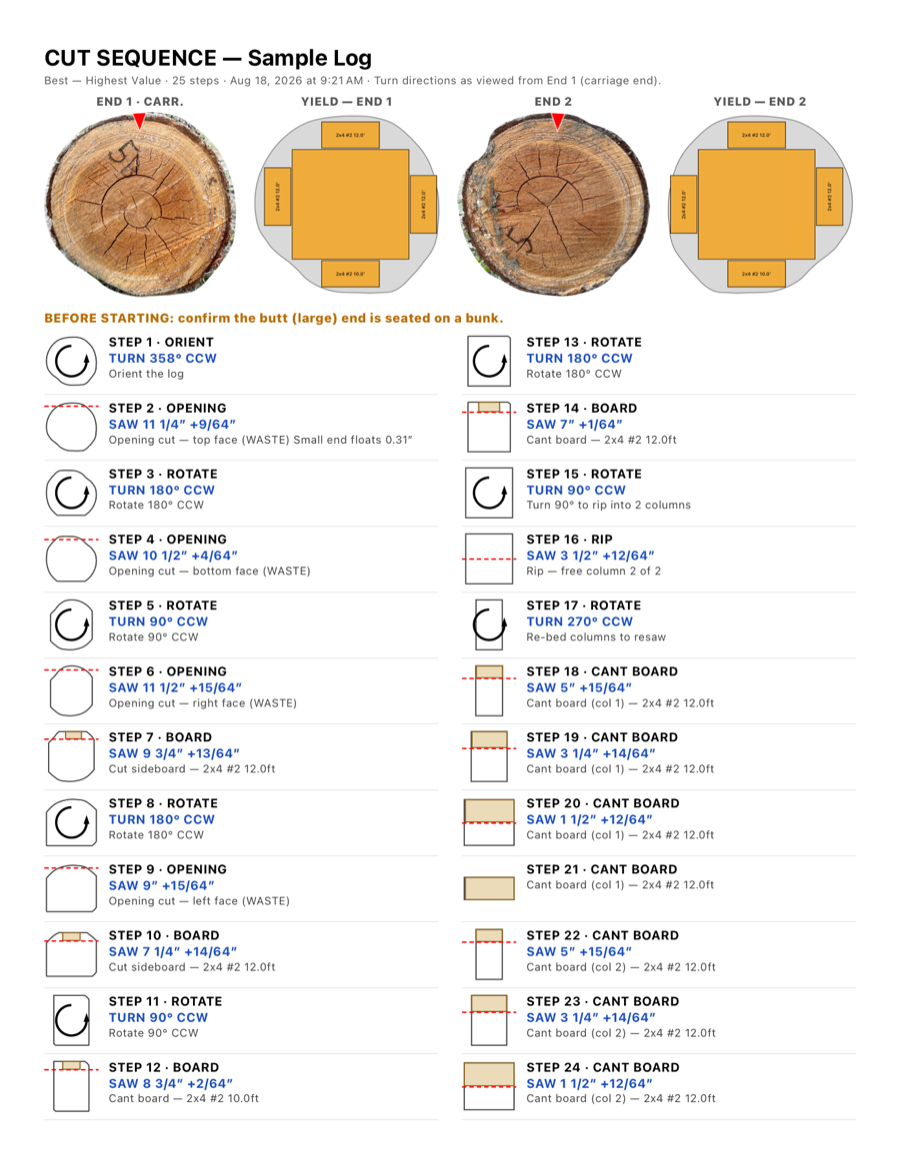
Cut Sheet — page 1 of 2 (page 2 is the overflow of the last step)
Header
Header
Element
Example
Description
Title
Cut Sequence — Sample Log
The exported PDF is titled this way, after the scan — the button that produces it is Cut Sheet.
Subtitle
Best — Highest Value · 25 steps · Aug 18, 2026 at 9:21 AM · Turn directions as viewed from End 1 (carriage end).
The optimization mode and its label, the step count, the export date and time, and the turn-direction convention the whole document follows, stated in full.
End thumbnails
4 images
The photographed end face and the yield diagram for each end, so the sequence can be checked against the physical log before cutting starts.
Before starting
notice
"Confirm the butt (large) end is seated on a bunk." Printed once, before step 1.
Step entries
Numbered in cutting order, two columns per page. Each entry gives the step type, the saw or turn to make, and a caption.
Important — saw position datumThe saw positions shown in the cut sequence are the thickness of material that will be LEFT on the mill after the saw pass — not the thickness of the piece being removed. Set your saw to leave this much material.
Step types
Type
Example
Description
ORIENT
Turn 358° CCW
Sets the log's starting rotation before the first cut.
OPENING
Saw 11 1/4" +9/64"
A waste cut that establishes a flat face to saw from.
ROTATE
Turn 180° CCW
Turns the log or cant to present the next face.
BOARD
Saw 7 1/4" +14/64"
Cuts a board. The caption names the product and length.
RIP
Saw 3 1/2" +12/64"
Splits a piece into two columns for separate resawing.
CANT BOARD
Saw 5" +15/64"
Resaws a board from the squared cant. The caption gives the column.
Saw heights are given in whole inches, a fraction of the scale mark and the setworks index count (or as one decimal position when Absolute saw readout is on in Machine Setup), and rotations as a turn and an angle — the same convention as the list view. A Live-edge solution prints its own, shorter sequence. See The cut sequence, including its section on Live-edge sequences.